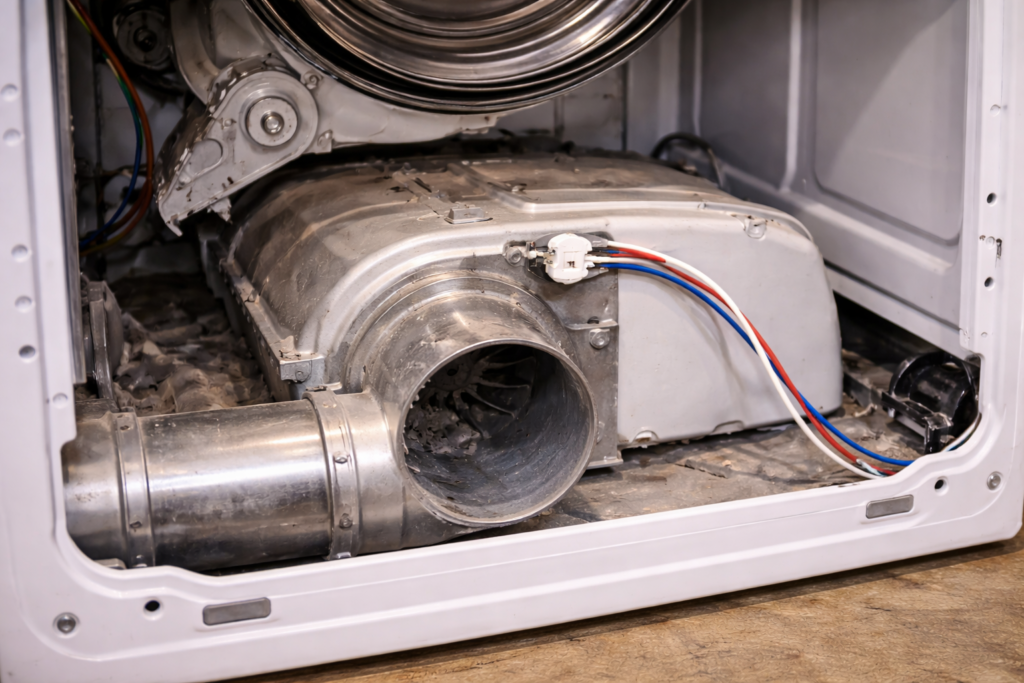
Samsung and LG dryers use thermal fuses to prevent overheating and protect internal components.
While access steps may vary slightly between front-load and rear-access designs, the replacement process is similar.
For a complete overview of symptoms, testing, and general replacement steps, see Dryer Thermal Fuse: Complete Guide (Symptoms, Testing & Replacement).
Common Symptoms in Samsung & LG Dryers
A blown thermal fuse may cause:
-
Dryer will not start
-
Dryer powers on but does not heat
-
Dryer shuts down during a cycle
-
Error codes related to overheating (in some models)
Always confirm failure with a multimeter before replacing the fuse.
Where the Thermal Fuse Is Located
In most Samsung and LG electric dryers, the thermal fuse is mounted on:
-
The blower housing
-
The exhaust duct
-
Near the heating element housing
Access typically requires removing the rear panel.
Some front-service models may require removing the top and front panels instead.
Step-by-Step Replacement
-
Unplug the dryer.
-
Remove the rear (or front) access panel.
-
Locate the thermal fuse along the airflow path.
-
Disconnect the two wire connectors.
-
Remove the mounting screw(s).
-
Install the new fuse in the same orientation.
-
Reconnect the wires securely.
-
Reassemble the dryer.
Restore power and test operation.
Check Venting Before Finishing
Samsung and LG dryers are sensitive to airflow restrictions.
Before completing the repair, inspect:
-
Lint filter
-
Vent hose
-
Ducting behind the dryer
-
Exterior vent hood
Restricted airflow is the most common reason thermal fuses fail.
Confirm the Correct Replacement
Before purchasing a new fuse, verify:
-
Exact dryer model number
-
Mounting style
-
Temperature rating
-
Connector type
Using an incorrect fuse may cause repeat failures or improper operation.
For a full overview of dryer thermal fuse problems, symptoms, testing, and replacement, see the Dryer Thermal Fuse Complete Guide.
## Related Dryer Thermal Fuse Guides
Best Replacement Dryer Thermal Fuses (Universal Options)